

Conversational AI for Your Documents: A RAG-Based Chatbot for PDFs and Excel Files

Updated: May 17
Interact with your documents as if you’re chatting with a colleague
What is this Chatbot, and How is it Built Using RAG?
In many professional settings, important information is buried inside PDF reports, Excel files, technical specs, and financial statements. Extracting specific answers from them often requires tedious reading, searching, or manual analysis.
To solve this, I’ve developed a lightweight AI chatbot that enables users to simply upload a PDF or Excel file and ask questions like:
“What is the total project cost mentioned?”
“Which department is responsible for execution?”
“What are the revenue figures for Q3?”
The chatbot then provides accurate, context-aware answers drawn directly from the uploaded document.
This is made possible using RAG (Retrieval-Augmented Generation) — an AI technique that improves answer accuracy by retrieving relevant content from documents and then using a language model to answer queries based on that context.
How It Works — Architecture Overview
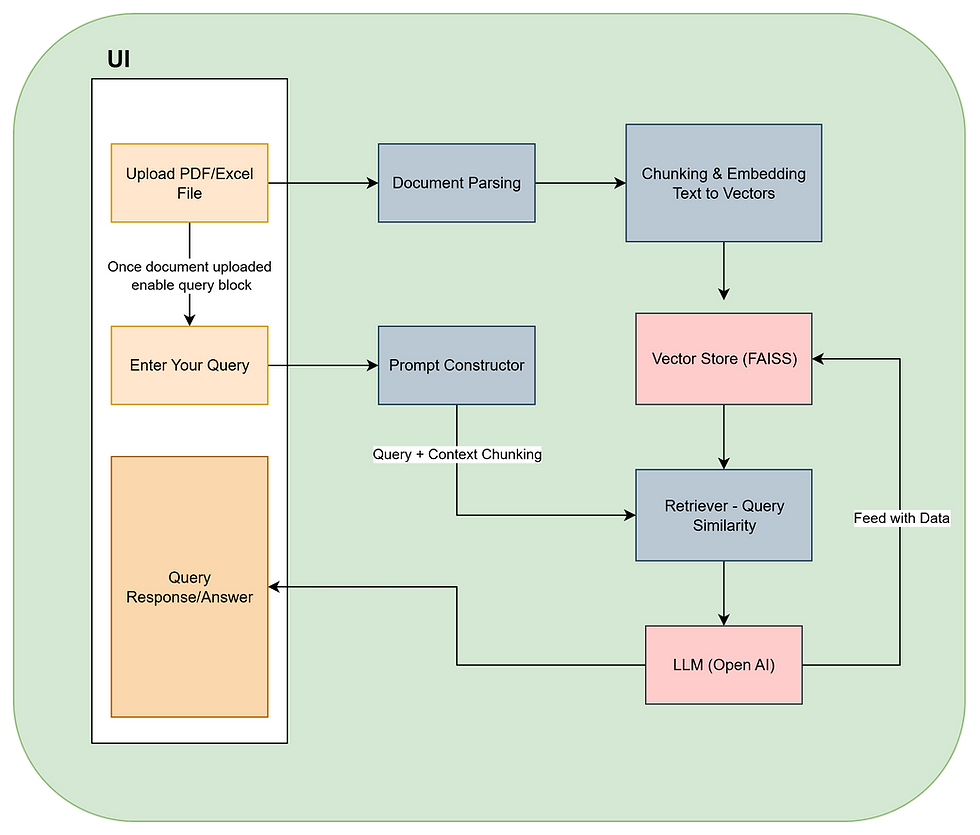
Here’s a simplified view of the chatbot’s architecture and workflow:
Step 1: File Upload & Content Extraction
The user uploads a PDF or Excel file. Text is extracted using document parsing libraries:
PDF: via PyMuPDF
Excel: via pandas
Step 2: Text Chunking & Embedding
The extracted text is split into smaller chunks (to preserve context). Each chunk is converted into an embedding — a vector representation of its meaning — using a pre-trained embedding model.
Step 3: Vector Store & Retrieval
These embeddings are stored in a vector database (FAISS). When a user asks a question, the chatbot searches for the most semantically relevant chunks of the document.
Step 4: Response Generation
The retrieved chunks are passed as context to a Large Language Model (LLM), such as OpenAI’s GPT, which then formulates a clear, contextually grounded answer.
This ensures the model doesn’t hallucinate or guess — it only answers based on what’s actually in the document.
Where Can This Be Used?
This chatbot has applications across multiple industries and domains. It can help automate internal document querying, enhance productivity, and even support customer self-service.
Finance & Accounting: Quickly get answers from spreadsheets or audit reports — totals, anomalies, or key trends.
Legal & Compliance: Identify specific clauses, obligations, or references within contracts and legal documents.
Engineering & Project Management: Query technical specifications, BoQs, status reports, or site documentation.
Human Resources: Extract policy details, compensation information, or compliance checklists from HR documents.
Academia & Research: Summarize research papers or locate specific references from academic PDFs.
Ready to Explore?
Whether you’re an engineer, analyst, researcher, or just AI-curious, this tool can be a valuable starting point for building your own domain-specific document assistant.
GitHub Repository: github.com/Abhiram-Mangde/RAG-Chatbot
Feel free to fork, extend, or deploy it in your environment. Contributions and feedback are always welcome.


Comments